Download & Run Free Scanpst Tool to correct Outlook file
Inbox repair tool is an in-built utility in Outlook, which is provided by Microsoft for free of cost to the email client users to handle file corruption issues in MS Outlook. If you are an outstanding users of Outlook, then you would already know that while sending/receiving or sharing information through any email application, sometimes users may face certain issues due to damaged PST file. So, in such situation, one can run scanpst tool which is designed to scan and rebuild Outlook 2007, 2010, 2013 and 2016 file followed by the entire items available in it, such as emails, contacts, calendar, etc.
Need to Run Scanpst.exe Tool
As you know that Outlook comes with lot of inbuilt features in it, but sometimes due to certain errors, the performance of Outlook may decrease and can suddenly stop from working. The slow performance of MS Outlook, will further lead to various problems for users when exchanging information with others. So, if the reasons behind the errors in Outlook are related to the PST file corruption, then it can be fixed by performing a require operation, by which users have to run SCANPST tool for rebuilding Outlook file.
Outlook Inbox repair tool is built with the aim to fix damages with lower level of corruption in a PST file. It works by examining the data structure of Outlook PST file and then fix it where it found a breakup of headers in an indexed table.
How to Rectify Outlook File to Solve Different Outlook Errors
Following are the top most occuring errors that are encountered in Outlook and can be fixed by running Scanpst tool:
- Cannot start Microsoft Outlook,
- Send or receive error in Outlook 2010,
- Outlook data file cannot be accessed,
- PST file is in use by another application,
- Outlook crashing in safe mode,
- Outlook send receive error 0x800ccc92, etc.
Location of Outlook 2003| 2007| 2010| 2013| 2016 Inbox Repair Tool
To locate to Scanpst exe utility, browse the required folder according to the Outlook versions after following the below path and proceed to run Scanpst.exe:
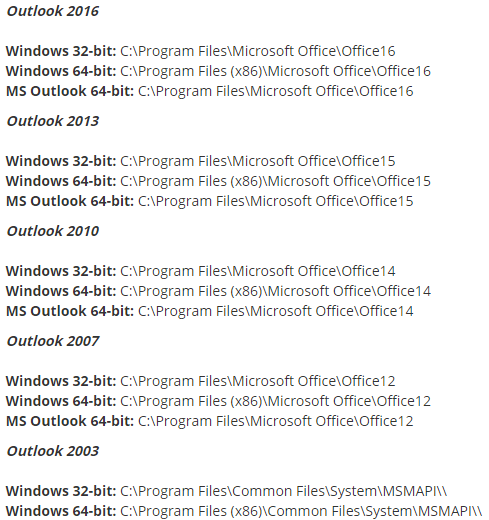
Best Manual Solution to Run SCANPST Tool
- Go to the correct path according to the Outlook version installed in your computer and double click on SCANPST to open it
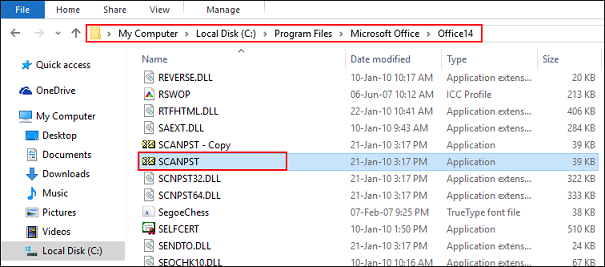
- After you have run Scanpst tool, click on Browse to choose the PST file to correct Outlook file
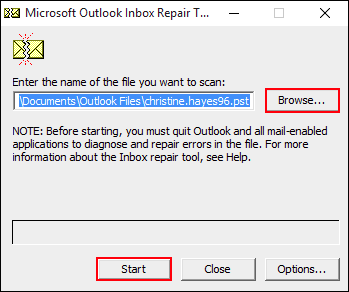
- Click on Start button to begin the scanning of PST files in your MS Outlook
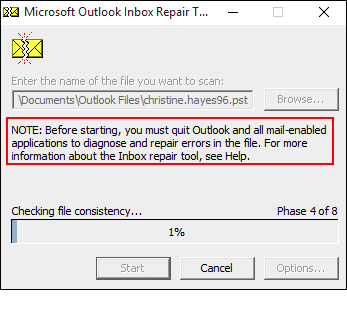
- After completion of scan procedure, you will see the details of the number of folders following the number of items that has been scanned
- Now to rebuild all scanned folders and items, click on Repair button
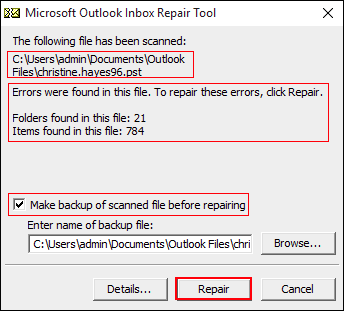
- Make sure that you took the backup of all scanned file. You can directly create a backup of the file by checking the option "Make backup of scanned file before mending Outlook file"
- Once backup is created, click on Repair button to correct Outlook file
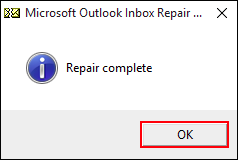
- Finally click on OK button to mend Outlook file completely.
Easily Rebuild Outlook File that are Permanently Lost
As mentioned above, it is nearly not possible for Scanpst exe utility to fix and rebuild Outlook file, in case they are permanently lost from storage device. This is because the SCANPST utility are limited to fix the minor damages in PST file, since it can only fix the breakup of headers in an indexed table, which is not enough to rebuild Outlook file that are highly corrupted. And hence users can opt for PST Recovery tool – it is a trusted and suitable third party utility to mend Outlook file in multiple number opposed with any size but with the surety of no data loss from PST in any manner.
Conclusion
This article will discuss about how to run Scanpst tool, need of using SCANPST to mend Outlook and diffrent Outlook errors that can be fixed with the help of this free Scanpst tool. Apart from this, users will come to know, how to rectify Outlook items available in PST that are highly corrupted or permanently lost using a third party tool.